虚拟化
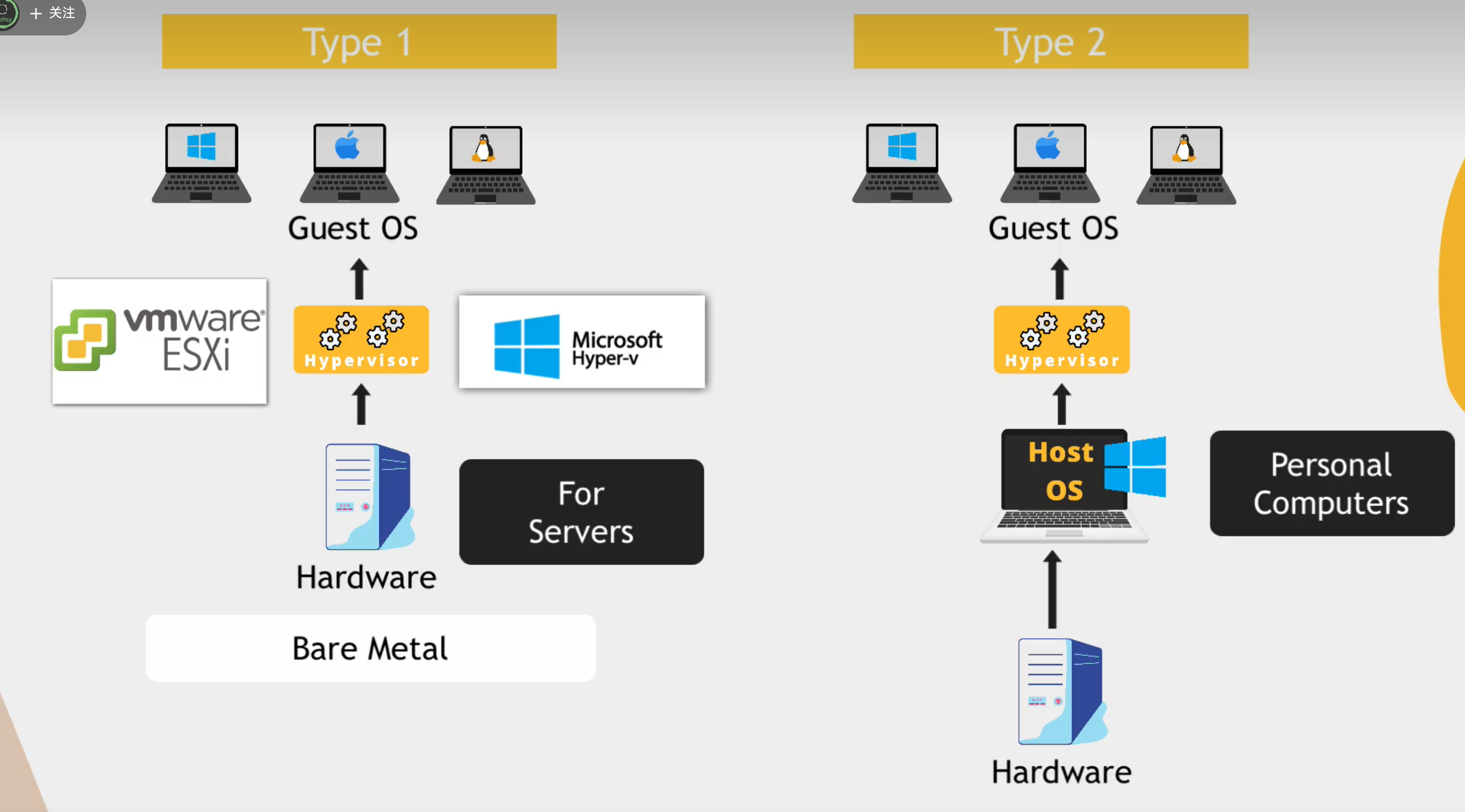 两种类型
why? abstraction of the os from the hardware.将os与硬件紧密相连?virtual machine image.变成了可移动的文件。
两种类型
why? abstraction of the os from the hardware.将os与硬件紧密相连?virtual machine image.变成了可移动的文件。
- secure very easily.快照os配置和安装的程序。
- portable。在不同的机器上移动
- not dependent on physical server
windows的c盘?历史 a b 盘是插入的软盘
cli
uname -a cat /etc/os-release lscpu/lsmem
grep:globally search for regular expression and print out.search for a particular pattern of characters and displays all lines that contains that pattern
shell
the program that interprets and executes the various commands that we type in the terminal.内核理解的指令。
- bash is a shell program, a programmin language
shebang#! 告诉os使用什么shell
- #:音乐符号,sharp
- !: bang
variables
- used to store data and can be referenced later
- variable_name=value assign the value to the var
Danger
=两边不要有空格
$var值
- variable_name=$(command) store output of a command in a variable
conditionals
-
allows you to alter the control flow of the program
-
execute a command only when a certain condition is true
-
[]=test
if [ -d "config"]
then
	echo "reading"
	config_files=$(ls config)
else
	echo "config dir not found,creating one"
	mkdir config
fi
Note
if[ condition] then statement else statement fi
basic operators
文件运算符
-d -r -w -x -f
关系运算符
数字 -eq -ne -gt -lt -ge -le
String 运算符
== != -n 大小不为0 str 不为空
passing 参数
positional parameters
arguments passed to script are processed in the same order in which they’re sent. the indexing of arguments starts at 1
config_dir=$1
"$config_dir"
read -p "please input something" user_input -p:prompt
读取所有的输入 $* represent all the arguments as a single string
$# total number of arguments provided
loops
for
Note
for var in word1 word2… do statements to be executed for every word done
echo "all params:$*"
echo "number of params: $#"

for param in $*
	do
		echo $param
	done
Note
while condition do statements to be execufted if command is true done
sum=0
while true
do
	read-p "enter a score" score

	if ["$socre" == "q"]
	then
		break
	fi

	sum=$(($sum+$score))
	echo "total score: $sum"
done- double parenthesis for arithmetic operations
$(($num1+$num2))
functions
definition + invoke
function score_sum{


}
function create_file(){
	file_name=$1
	touch $file_name
}
create_file test.txt
score_sum
$?:captures value returned by last command
function sum(){
	total =$(($1+$2))
	return $total
}
sum 2 10
result=$?
echo "$result"
environment variables
- key = value pairs 键值对
- variables store information about the environment
printenv|less
printenv USER
echo $USER
环境变量 整个环境都可用
先导出
export DB_USERNAME=dbuser
只会在当前会话有效。seesion
永久
.bashrc文件里添加
source ~/.bashrc load the new env vars into the current shell session
删除
unset NAME
全局设置的env var
/etc/environment
PATH
- list of directories to executable files,separated by :
- tells the shell which directories to search for the executable in response to our executed command
不用输入可执行程序的全路径了 只需输入名字